Tracking
The Tracking section is the operator's workspace for monitoring objects in real time. It shows the current location of each object, its speed, the state of the connected equipment, and active alarms. Objects can be monitored as a single list or by groups.
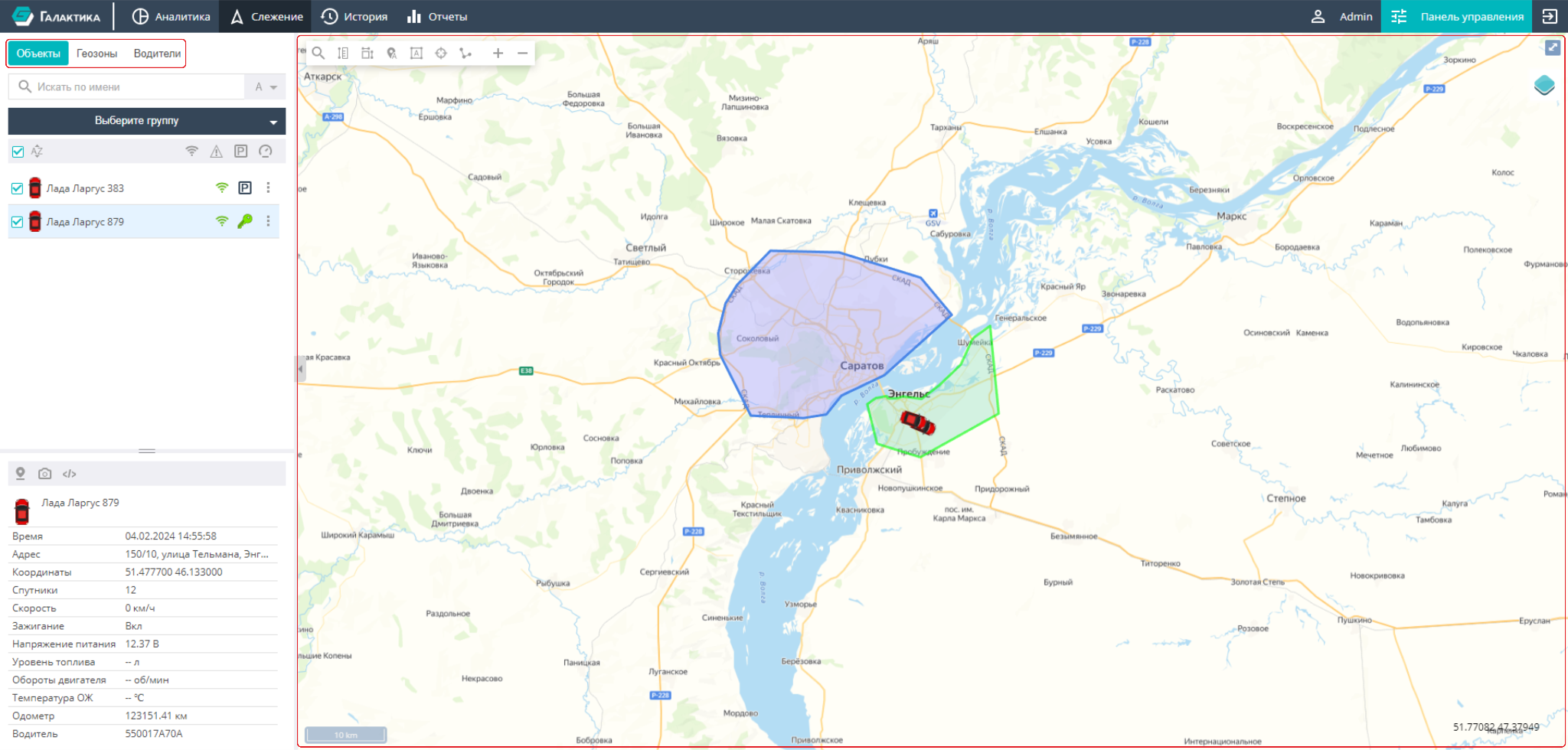
Screen layout
The screen is split into two areas; the border between them can be dragged:
-
Left panel — lists of monitored entities, switched by tabs:
- Objects — the list of monitored objects with their current status;
- Geozones — geographic zones and their display on the map;
- Drivers — the list of the company's drivers.
The list is shown in the upper part of the panel, and the card of the selected item with its detailed data is shown below. The set of tabs depends on the user's permissions: tabs that are not available are not displayed.
-
Right area — the map (always shown) and, below it, the Events panel with the list of active alarms. The border between the map and the Events panel can be moved, and the panel itself can be collapsed.
Unlike the previous version of the documentation, the "Map" is not a tab — it is a permanent area on the right of the screen. The list of alarms has been moved to a separate Events panel.