Analytics
The Analytics section gives an overview of how monitored objects and drivers performed over a selected period: key figures and charts on mileage, fuel consumption, engine hours and violations, plus tabular reports on objects. The section is shown to users who have it enabled in their access rights, provided they can also view history — the same right required for the History, Reports and Service sections.
The section menu is on the left side of the screen. It is collapsed initially, showing only the subsection icons. The button at the top of the menu expands it: the icons get captions and the button itself is labelled Hide menu; clicking it again collapses the menu.
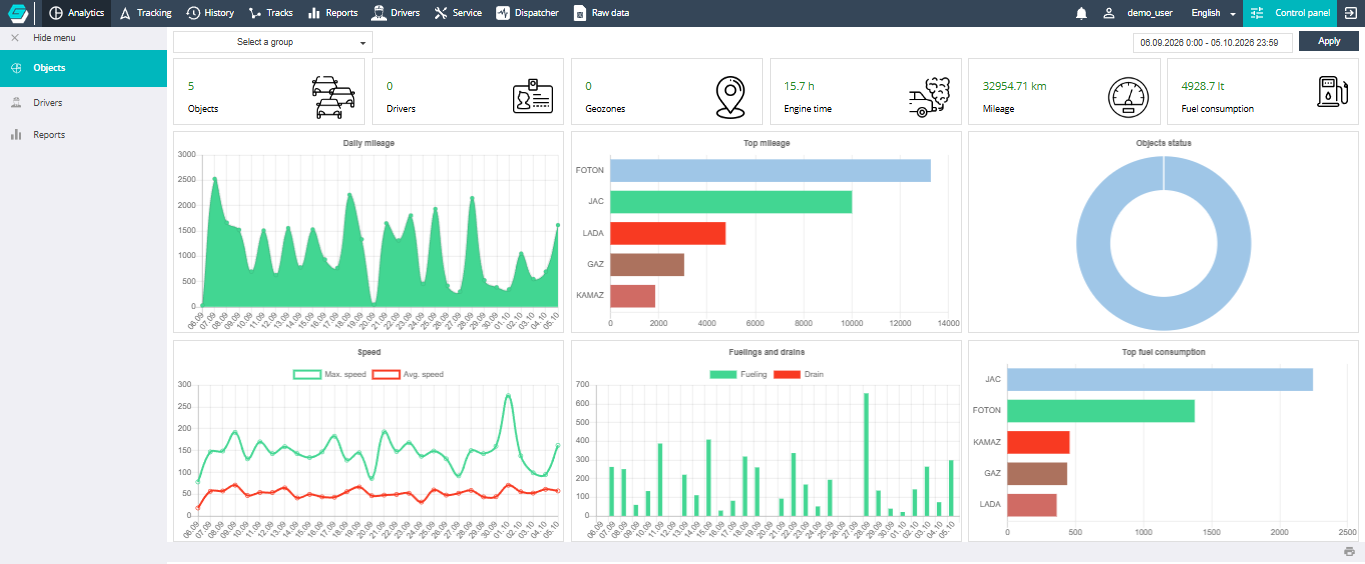
The menu contains three subsections:
- Objects — key figures and charts on objects; the section opens on this subsection;
- Drivers — key figures and charts on drivers: trips, violations, penalties;
- Reports — tabular reports on objects: summary, daily, fuel consumption and monthly mileage.
In every subsection the period defaults to the last 30 days, including today.